Bernadette (Wnek) Neal
Overview: Instructional Strategies & Assessment Methods
EDUC 766 is the second of four courses in the Graduate Certificate Program
in Instructional Design. Topics covered include:
Instructional Objectives
Absorb, Do, and Connect Activities
Universal Design for Learning
Assessments
Evaluation
Alignment Chart
An alignment chart is a tool used by Instructional Designers that lists objectives, assessments, and activities for instruction to ensure that each item is directly related to and supports the other items so that the most effective learning can take place. Instructional Objectives state what we want the learner to do as a result of our instruction in clear, specific, and measurable terms. Assessments are the ways we can collect evidence that proves to us that the learner has achieved the objectives. Activities are all the different experiences that a learner engages in during instruction to help him or her process the information or practice it in order to demonstrate their learning through assessments and eventually apply it in the real world. When each of these three items connect, we call this alignment. And when objectives, assessments, and activities align, Instructional Designers can design and develop instruction that gives the learner no more and no less of what he or she needs to learn and learners & instructors have a clear roadmap for learning and expected outcomes. When these three items do not align, some the consequences are learners spending time on content that is irrelevant, engaging in activities that reinforce misconceptions, or being assessed incorrectly. So then, misalignment results in ineffective learning.
The alignment chart I developed below lists 3 of 9 Terminal Objectives for an online, self-paced course on how to manage an online community. Because we all learn in different ways and receive our "aha moments" through different experiences, a variety of strategies and activities were selected and aligned with each of the Enabling Objectives created for the 3 Terminal Objectives.


Sample Activities
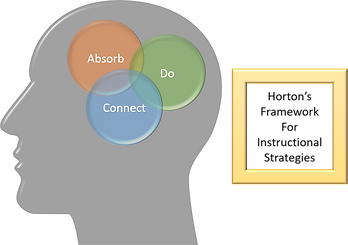
According to William Horton (2012), there are three types of learning activities needed for learning: Absorb activities, Do activities, and Connect activities. Absorb activities are ones in which the learner takes in or “absorbs” some information presented to them, typically, in the form of reading text, listening to audio narration, or watching a video. The learner is not active physically, but is active mentally. Do activities give the learner opportunities to “do” something with the information they were given. These are exercises that allow the learner to apply the information they received in the Absorb activities and get practice to develop a skill or integrate the knowledge into long term memory. Connect activities make learning personal and shows how the learning “connects” to their lives. Learners take the knowledge and skills they have absorbed and practiced, connect it to prior learning, and apply it to their own personal or professional lives.
When creating learning activities, it is important to consider opportunities to incorporate Universal Design for Learning (UDL). UDL is a framework, based on research, used by instructional designers, instructors, or anyone involved in creating learning content that allows everyone an equal opportunity to learn to the best of their abilities. UDL is not just about including accommodations for those with hearing, visual, or physical impairments, but designing learning in a way in which ALL learners can benefit.
Below are examples of the three types of activities Horton discusses in E-Learning by Design that I would include in my course on online community management. I also describe ways UDL will be incorporated into each learning activity. The activities are aligned to the following Terminal Objective, and more specifically, to one if its Enabling Objectives.
Terminal Objective: Demonstrate the importance of community management by actively engaging with the community daily
Enabling Objective: List 3 causes of why users leave an unmanaged community
ABSORB ACTIVITY: Slide Show Presentation
The first Absorb Activity of this lesson would be presenting learners with a simple slide show presentation that lists some of the more common causes of why users would leave an unmanaged community. Each cause listed would be a clickable button that would display more information about that cause. To support Universal Design for Learning, specifically Checkpoint 1.3 (Offer alternatives for visual information), learners can choose to play audio that will read what is displayed on the slide. Learners would click a speaker button near the lower right corner of each page. This alternative not only provides an accommodation for those with a visual impairment, but can be used by any learner who prefers to hear content instead of reading it. A note would be provided at the beginning of the course letting learners know what the icon stands for.
This activity is considered an Absorb activity because learners are reading and listening to a list of causes and explanations of each cause. The slide show is a straightforward presentation of information. At this point, the learner is not doing anything with the information other than taking it in. This would be similar to a lecture that learners might be listening to in an in-person classroom setting. Allowing learners to click on each cause would allow some choice in what the learner wants to learn more about.

DO ACTIVITY: Mini-Case Study
After learners have received all the information presented about causes for users leaving a community, it's time to turn that information into some practice. This is where a Do activity comes in. Learners will read a mini-case study that will describe an example of a failing online community. Learners will click through several slides giving them background information, bad decisions made by the community manager, and what happened as a result. There will be a question slide right before the learners are told what the community manager did to fix the situation. The question slide will ask the learners to identify 3 causes for users leaving the community described in the case study. When the learners select correct answers, they will receive feedback to reinforce why the answers are correct. When the learners select incorrect answers, an explanation will be given as to why that is not the correct answer. Learners cannot move on until the 3 correct causes have been identified. After the learners correctly identify the 3 causes, the case study will continue to describe what the community manager did to address each cause. To support Universal Design for Learning, specifically Checkpoint 7.2 (Optimize relevance, value, and authenticity), the case study is describing a situation with which all the learners are currently struggling, and can easily put themselves in the same shoes as the community manager described in the case study. Being able to identify causes for users leaving a community in the case study gives them practice for identifying causes in their own communities.
This activity is considered a Do activity because learners are given the chance to do something with the information they received during the Absorb activities, and that is what a Do activity is all about. Learners need to engage in some kind of practice with the information they received in order for deeper learning to occur. With this mini-case study exercise, learners will be given a chance to read an example, think about all the causes they read about, and identify for themselves why users left the community in the case study. They are not just being told what the causes are. They are actively looking for them.

CONNECT ACTIVITY: Journal Activity
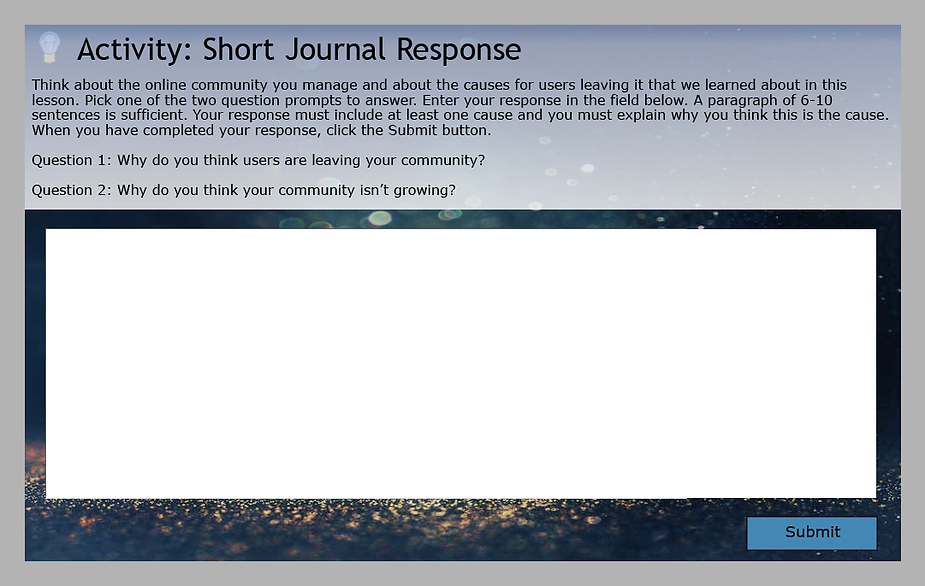
Learners will have finished getting practice in examining a fictitious community, but one not unlike their own. So, to make the learning go deeper and have learners really to see how this information applies to them, they will be given a short Journal Activity so they can reflect about their own failing online community. They will be given a choice of two prompts to reflect on: “Why do you think users leave your community?” or “Why do you think your community isn’t growing?”. Learners will write a short reflection response for one of these questions. Because this is an online, self-paced course, this response, along with all other journal activities in the course would be submitted all at once to an instructor who would review the responses and give personalized feedback and can assess how well the learner is internalizing the content. For this specific Journal Activity, a passing grade would be for a response that includes at least one of the causes mentioned in the lesson that the learner can identify in their own community and explain why they think that is the cause. If the learner can start to identify a cause for users leaving, they can focus on the solutions that will be presented throughout the course. Depending on the tool used, learners can submit their journal entry as a written response or verbally express their response and submit it as an audio file. This option would support the UDL Checkpoint 5.1 (Use multiple media for communication). This alternative not only assists those who may have difficulty typing, but anyone who prefers to talk rather than write would benefit from this option.
This activity is considered a Connect activity because learners are reflecting about this information in their own context and applying it in their real life. They are connecting what they’re learning to something they already know. They have learned about a variety of causes of a failing community and now have the chance to identify which causes may be contributing to their own community, helping them focus on strategies later in the course on how to fix the cause(s).
References:
Horton, William. E-Learning by Design (Second Edition). (2012). San Francisco: Pfeiffer. 615 pages.
ISBN 978-0-470-90002-4
CAST (2018). Universal Design for Learning Guidelines version 2.2. Retrieved from http://udlguidelines.cast.org
Assessment
After creating measurable and specific objectives, we need to collect evidence that the learner is progressing towards or has achieved the stated learning outcomes. Therefore, we need both formative and summative assessments. Formative assessments are activities that learners can do over, so they can apply knowledge, practice a skill, or reflect on their attitudes. It’s important to include a variety of formative assessments throughout a course to reinforce or correct learning. Formative assessments are also tools that can be used by Instructional Designers and Instructors to gauge where the learner might need additional guidance or how the learning materials can be improved. Formative assessments are therefore used as both a learning tool and evaluation tool. Summative assessments are appropriate for the end of the lesson or course to prove how well the learner has achieved the learning goal of the course. These assessments, which are typically graded against some standard, are the final artifacts from learners to show how well they have processed all the information in the lesson or course, thought critically about the information, and how ready they are to apply it in real world scenarios.
The course for this project will use a blend of formative and summative assessments and be delivered through an online and self-paced course. Because there is no formal instructor or other students in the “class”, many, but not all, of the assessments will be graded by the computer. Most formative assessments (those graded by the computer) will display meaningful feedback immediately, while some formative assessments and the summative assessments will require some time for an “instructor” to reply with specific feedback. These assessments will include: multiple choice quizzes, drill & practice activities, knowledge checks, a job aid activity, checklists, and problem-based scenarios for practice opportunities and checking learners’ knowledge and comprehension at the lower end of Bloom’s Taxonomy; surveys, ponder activities, and journal responses used for self-reflection and assessing any change in attitudes towards the topic; composition questions, observe-and-comment activities, case studies, mini-scenarios and practice exercises to give learners hands-on practice with individualized feedback. These last set of assessments would need to be submitted to an “instructor” to assess how well the learner is applying and thinking critically about the learning content. The summative assessments would be an original work activity that will be given at the end of various lessons and at the end of the course that takes the skills and knowledge learned throughout the course and applies it to a real-world situation, i.e. the learner will identify several scenarios in his or her online community that he or she is managing and create original responses and programs that they would use in the community and submit the project for assessment to an “instructor”. These assessment ideas were selected because they work well with the online, self-faced delivery option being used, give the learner a variety of ways to learn and practice the information without having an instructor or classmates, and show the immediate value of the activities.
Below are sample quiz questions used for formative assessment for the Terminal Objective: Evaluate member-submitted content and moderate member behavior to choose the correct action for negative or inappropriate content and behavior. The quiz questions would be sprinkled throughout the lesson, "Online Community Moderation", covering this objective.
Question 1
How often should you read new posts in the community you are managing?
A) Hourly
B) Daily
C) Every other day
D) Weekly
The correct answer is B.
Feedback: As a community manager, you should be in your community everyday reading new posts so that you can ensure inappropriate posts are removed within 24 hours. Obviously, if you can do it sooner that’s even better, but checking the forums hourly leaves you a lot less time to complete any other tasks you need to work on. As a general rule, community users will expect a community manager to be active on a daily basis.
Question 2
You are managing a community for a software company that produces a software product for organizing personal finances. Should the following post be removed from the discussion forum?
“I disagree with you. I tried out the latest release and I didn’t like it. It was clunky to use. The other UI was way better. If you liked the headers and used those to categorize your monthly expenses, those are gone. I can’t find any way to do it. At least they fixed that bug with the sorting feature. But, they moved it to the second tab at the bottom. It’s a bit hard to find. That really is so frustrating. I wish they would put it back. I think I might go back to the old version if I can. They really need to do more work on this thing.”
A) Yes
B) No
The correct answer is B.
Feedback: It’s ok for posts to have a balanced mix of criticism and useful information to share with the community. It’s important not to over censor posts by community members or you are at risk for alienating your members and driving them away, as well as harming your company’s brand.
Question 3
You are managing a gardening forum. Using the attached Community Guidelines as a reference, should the following post be removed from the discussion forum?
“Hi John789,
I read your post about the problems you are having in your garden. I just started a new landscaping business. I have 10 years of experience in landscaping and solving pest problems. Call me for a free quote at (123) 456-7890. I can give you a discount of 10% if you hire me tomorrow.”
A) Yes
B) No
The correct answer is A.
Feedback: There are two reasons this post needs to be removed. First, this post is spam. Even though it’s on the topic of gardening, the user is advertising his business, which is not acceptable according to the Community Guidelines. Second, the user included personal information in the post, which according to the Community Guidelines, is an acceptable reason for removal.
Question 4
A customer posted a compliant on the forum about her experience trying to make a return and being refused. While she was clearly angry about not being able to make a return, her post did not break any of the Community Guidelines about inappropriate content. But, her post warrants a response. The community manager writes the following response:
“Dear SMoore23,
I’m sorry you had such a bad experience with our customer service team. I agree that our return policy is way too strict and should be revised. I don’t why they would require that much information for a return. I promise to get you a return on your item. I’m here to make sure you are a happy customer.
Sincerely,
Community Manager Joe”
Is the response acceptable to post on the public forum as the community manager?
A) Yes
B) No
The correct answer is B.
Feedback: As a community manager, you need to balance the needs and wants of the community members with goals and image of the company for which you work. While it is a good to be an advocate for community members and try to resolve their problems, you should not disparage the company or promise something you can’t deliver.
Question 5
Assess the following user post.
“Well, thanks for the enlightenment, Bob! How long did it take you to come up with that lousy response? Tell me something I don’t know already. I bet you didn’t even TRY to read the guy’s post. Do any of you people in this forum post anything of value?! That goes for the lame community manager here too!”
What is the appropriate course of action? (Select one of the following options.)
A) No action needed.
B) Warn the user on the public forum that his post is inappropriate.
C) Remove the post.
D) Deactivate the account and inform the user why his account was deactivated.
The correct answer is A.
Feedback: This user is a troll. The first step in dealing with trolls is to ignore them. They are looking for a way to engage members in a negative way and start an argument. When they learn the community is ignoring them, most of the time, they will leave on their own because they are not getting the reaction they want.
Reflection
Overall Instructional Design Process
Review. Redesign. Don’t Repeat.
That headline sums up much of my experience in this class, which focused on the Design stage of the Instructional Design process. The major theme of the class was ensuring that objectives, assessments, and activities were all in alignment. This activity required a lot of stepping back reviewing my Alignment Chart, rethinking what activities I included or didn’t include, revising how I implemented the activities, and trying not to make the same mistakes during the first round. Or second round. Or third round. You get the point.
An "aha moment" for me was realizing that assessment and activities go hand in hand. By that I mean, assessments can be used as Do and Connect activities, but those activities can be used as formative and summative assessments as well. At the beginning I was struggling to think of different items to put in the Assessments column vs. the Do/Connect Activities column because I thought they needed to be different. In fact, being the same is what makes Assessments and Activities align. Although, that struggle did allow me to come up with a great variety of activities, which in itself is a best practice.
I also discovered that certain activities are better than others depending on objectives. In each Summary section of Horton’s book, E-Learning by Design, he includes a chart that indicates which type of activity is better for which kind of objective. For example, if the objective is to have a learner create something, a physical demonstration would be a better Absorb Activity than a discussion.
The following research-based best practices are the ones that I feel stuck with me the most because of the value they provide in deepening learning and creating an authentic experience for the learner: Interactivity, Models and Worked Examples, and incorporating the principles of Universal Design for Learning.
Interactivity
Because the course I’m working on for my portfolio project is an online, self-paced course, including lots of opportunities for interactivity is not only critical, but is fairly easy to do given the technology and tools at hand and a bit of creativity.
Interactivity, in the context of Absorb Activities, promotes engagement & motivation and helps keep the learner focused. At first, before reading about Horton descriptions and examples of Absorb Activities, I thought these are the easiest activities to implement because it’s just reading some text or watching a video. True, those are a couple of the most popular ways to present information to learners, but not the only ways. To really create engaging and effective Absorb Activities, you need interactivity. How did I do that? Something as simple as making learners click on buttons to read information is one example. In the Absorb activity I have presented on my “Sample Activities” tab, I show how learners can click a button for each item in a list in order to get more information on that item. I could have easily just created a bullet point list or dedicated one slide to each item with a paragraph to read, but forcing a learner to do something as easy as a click can make the learner more engaged with the content.
According to Horton (2012), learners should spend about “40% of their time absorbing, 50% doing, and 10% connecting” (p.58). So, interactivity within Do and Connect Activities is important since learners should be spending most of their time doing something with the content they absorbed and getting lots of opportunities to practice. One example of interactivity is described in the Do Activity presented on my “Sample Activities” tab. In the case study, learners must answer a question and click all the correct responses in the case study before moving on in the course. It’s not just the physical interaction with the course, but the mental interaction of thinking about what is happening in the case study and getting involved with it that makes it interactive. I’ve tried to incorporate as many case studies, scenario-based questions, and character dialogues as possible throughout the course. Studies have shown that when a learner interacts with learning content it activates long-term memory and creates a deeper learning experience.
Models and Worked Examples
Using models and worked examples are a great way of giving concreteness to theories and guiding learners to apply their learning in a gradual way. For much of my schooling, both as a child and as an adult, I seem to struggle with taking some obscure or general thought, principle, or theory and putting it into action unless I am given a concrete example of it that provokes that “aha moment”. This is why I would include this version of instructional scaffolding in any kind of learning content that I would design. During this class, when reading my peers’ discussion forum posts, I would often ask myself, “How did they arrive at that conclusion?” or “What was their thought process behind that decision?” This is what made me want to include models and worked examples in my portfolio project course.
There are three examples of models and worked examples in my project. One is the “Day in the Life of Jane” as I call it. This is an Absorb activity where I got creative. I could have easily just listed a bunch of tasks that a community manager does, but instead I wanted to present a model who would describe what she does and the questions she asks herself daily to arrive at the decisions she does, which then leads to what actions she takes. Another is what I call the “Thinking Community Manager”. A community manager is presented with a problem and, using thought bubbles, the community manager works out a solution. And, finally, each case study follows the same idea as the previous two, in that, the community manager shows how they work through a problem to arrive at a solution. These three similar types of models show learners how to think about what to do as a community manager, and most importantly how to apply what they learned.
Universal Design for Learning
I’ll admit, when I heard about topic of Universal Design for Learning (UDL), I immediately thought Section 508 compliancy. Susan Manning’s story about her stroke experience (Storytelling by the Instructor is a great Absorb Activity, by the way.) really illustrated how it can be more than that. While providing accommodations for those with permanent disabilities is important and is a part of UDL, it’s more about providing a variety of opportunities for ALL people to have a chance of learning as best they can. A strategy that an Instructional Designer includes to help someone with a hearing impairment, for example, summary notes from a lecture, can help anyone who might not be able to focus during a lecture, prefers reading to listening, or is more of a visual learner.
After reading the UDL Guidelines, I discovered it’s not that hard to implement at least a few UDL practices when designing learning content. Some of the suggestions given are easy and things I would do anyway, not even realizing it supports UDL. For example, the easiest suggestion with regards to presentation of information is having a contrasting background and font colors. I’ve seen presentations where the presenter had white text on a yellow background! And my biggest pet peeve is when everything on a page is a different color, font size, and font to the point that nothing in particular is emphasized and is just a visual mess.
Two decisions I made in my portfolio project that support UDL are adding audio for narration that learners can choose to click on to have the content on the slide read to them and allowing users to submit their choice of an audio file or a written response for journal activities. Providing audio narration can be used by anyone, not just someone with a visual impairment. I also wanted to give learners a choice as to whether or not it plays because some learners might not like learning aurally and some might be in an environment where playing the audio can be distracting to others. Allowing learners submit a response verbally or through written words allows learners to choose the means of expression they are more comfortable with or feel is their strength. I, personally, feel I can express my thoughts more clearly by writing them rather than saying them out loud. Also, there may be learners who have experienced a temporary physical impairment, like a broken arm, which would make the choice of submitting an oral response appreciated.
One of the goals of the Instructional Design process is creating learning in which everyone can succeed.